If you get electricity from FESCO (Faisalabad Electric Supply Company), here’s a simple guide to checking your bill online and paying it, step by step. Want to check your bill right now instead? Check your FESCO bill here on our homepage.
Why Check Your Bill Online?
Sometimes your bill doesn’t reach your address on time. If it’s late and you miss the due date, you could end up paying a late payment surcharge. Your bill could also just get lost or misplaced. In all these cases, checking it online saves you the trouble.
Find Your Reference Number or Customer ID
Take any of your old FESCO bills. You’ll find two numbers printed on it: the Reference Number and the Customer ID. You can use either one to check your bill.
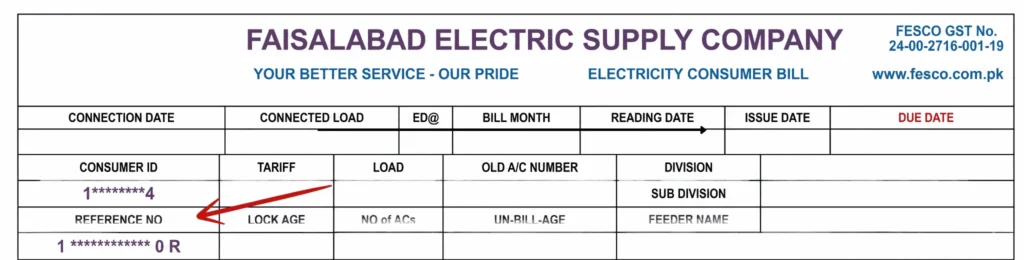
There’s also a small letter before the Reference Number, either “U” or “R”. U means Urban and R means Rural, so keep that in mind when you’re checking your bill, since you’ll need to select the matching option.
Enter Your Number and Search
Enter your Reference Number or Customer ID in the box on our homepage, select Urban or Rural to match your bill, and click Search. Your full electricity bill will appear on the screen in a few seconds, with all the same details as the paper copy delivered to your home.
Save or Print Your Bill
Once your bill is on screen, click Print Bill. From there:
- If you want a hard copy, select your printer and print it
- If you want to save it as a PDF, choose “Save as PDF,” pick where you want to save it, rename it if you like, and click Save
Your bill will be saved wherever you chose, ready to use for payment or your own records.
How to Pay FESCO Bill Online | Electric Bill Pay Step-by-Step Guide
Paying your FESCO (Faisalabad Electric Supply Company) bill doesn’t have to mean standing in long queues anymore. These days, you can settle your electricity bill right from your phone using apps like JazzCash, eSahulat Nadra, Faysal Bank, UBL Digital, and HBL Mobile. Below is a complete, easy-to-follow guide covering all five methods so you can pick whichever works best for you.
Pay FESCO Bill Through JazzCash
JazzCash is one of the fastest ways to clear your electricity bill. Open the app, log in to your account, and from the home screen tap on “Utility Bills,” then select “Electricity” from the categories that appear. Choose FESCO as your provider, and you’re ready for the last few steps:
- Enter your Consumer Reference Number exactly as printed on your bill
- Tap to fetch the bill so the current amount due shows up
- Review the amount, then tap “Confirm” to finish

That’s really all there is to it — your bill gets paid instantly, and JazzCash also saves it as a favorite so future payments take just a few seconds.
Pay FESCO Bill Through eSahulat Nadra
The eSahulat Nadra app is another solid option, especially if you’re already using it for other government or utility-related services. Open the app, log in, and head over to the “Utility Bill Payment” section. From there, select “Single Bill Payment” and tap “Proceed,” then choose “Electricity” and select FESCO from the list of companies.
You’ll need to fill in a few details: your bill’s Reference Number in the Consumer Number field, and the Consumer’s CNIC (if you don’t have access to it, you can use your own CNIC as the account holder instead). You’ll also need to select your mobile network and provide a number where Nadra can send an SMS confirmation once the payment goes through.

Once everything is filled in, tap “Pay Bill,” and the app will show you a full summary — company name, consumer number, reference number, consumer name, billing month, bill amount, payable amount, and due date. Review it carefully, then confirm the payment. You’ll see a success message along with a Transaction ID, and Nadra will also send a confirmation SMS. If you’d like a printed copy, the app even supports Bluetooth printing, provided you have a compatible printer connected.
Pay Electricity Bill Through Faysal Bank App
Faysal Bank recently updated its app, making bill payments even simpler than before. After logging in, tap “Pay Bills,” then “Utility.” You’ll see two choices here — “Instant Pay” for a one-time payment, or “Add Bill” if you’d like to save it for repeated use later.

If you go with Instant Pay, select “Electricity,” then choose your city (depending on your location, FESCO may appear grouped under a nearby regional listing). A couple of things are worth being careful about at this stage:
- Enter your Consumer Number exactly as shown on your bill — this is the Reference Number
- Don’t include the “AR” code that sometimes appears right next to it, as that’s a separate value
After entering the number, tap “Next,” and the app will display the account holder’s name along with the bill amount so you can confirm it matches your actual bill. Once you’re sure it’s correct, tap “Next” again and swipe to pay. An OTP will be sent to your registered email or phone, and entering it finalizes the transaction. From “View Details,” you can take a screenshot, share the receipt, or save it for your records.
Pay Electricity Bill Through UBL Digital App
UBL Digital works a little differently since it requires you to add a bill before paying it. Open the app, log in, and tap “Payments” at the bottom of the screen, then “Bill Management,” followed by “Get Started” and “Utility Bills.” Since this will likely be your first time adding this bill, tap “Add.”
Under “Select Company,” scroll through and choose FESCO, then enter your Consumer ID — essentially the Reference Number from your bill (there’s a barcode scanning option too, but typing it manually tends to be more reliable). Give the bill a name under “Save Bill As” so you recognize it easily next time, and tap “Save.” An OTP will be sent for verification, filling in automatically if your SIM is active on the same device.
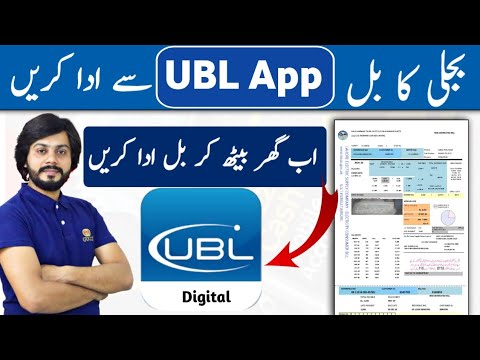
Once the bill is added, the amount due will appear. Tap “Continue,” review the final summary, and tap “Pay Now” to complete the transaction. When it goes through, you’ll get a “Payment Successful” confirmation, and you can download the receipt directly from the app for your records.
Pay Electricity Bill Through HBL Mobile App
The HBL Mobile app offers a similarly smooth experience. After logging in, tap “More” from the home screen, then look under the Bill Payments section for “Electricity.” If it’s not immediately visible, tapping “View More” reveals the full list of categories, or you can simply search for “Electricity” using the search bar.
Once you tap on it, select FESCO under “Select Company,” then enter your Consumer Number or Reference Number exactly as shown on your bill and tap “Next.” The app will fetch your bill details — take a second here to confirm the Consumer Name matches your actual bill, since this ensures you’re paying the correct account.
From here, the process wraps up quickly:
- Scroll down to check the payable amount, due date, and total, then tap “Next”
- Enter the OTP sent to your registered number (it may auto-fill if the SIM is on the same device)
- Tap “Pay” to process the request
Once verified, you’ll see a confirmation screen with a Transaction or Receive ID, and you can tap the three-dot menu to save or share it. HBL will also ask if you’d like to save the bill under a custom name, which speeds up future payments and even warns you if you accidentally try to pay the same bill twice.
Final Thoughts
All five apps — JazzCash, eSahulat Nadra, Faysal Bank, UBL Digital, and HBL Mobile — make paying your FESCO electricity bill fast, secure, and hassle-free. The core steps are largely the same across platforms: select the electricity category, choose FESCO as your company, enter your Consumer or Reference Number correctly, confirm the bill details, and complete the payment with an OTP. Whichever app you already use for banking or mobile wallet services is likely your most convenient option, so there’s no need to download a new app just for this. Keep your bill handy so you can double-check your reference number, and you’ll have your FESCO bill paid in just a couple of minutes.